Back to projects

Waggot Cams work experience

Spintron / Camshaft Dyno

A Waggot Cams project to turn a camshaft test rig into an integrated remote-control and measurement system using a computer program, a Nucleo microcontroller interface, VFD control, encoder feedback, Keyence laser lift measurement, and physical CAD mounting work.

Computer program Nucleo / STM32 VFD control Encoder + Keyence laser CAD mounts Data analysis
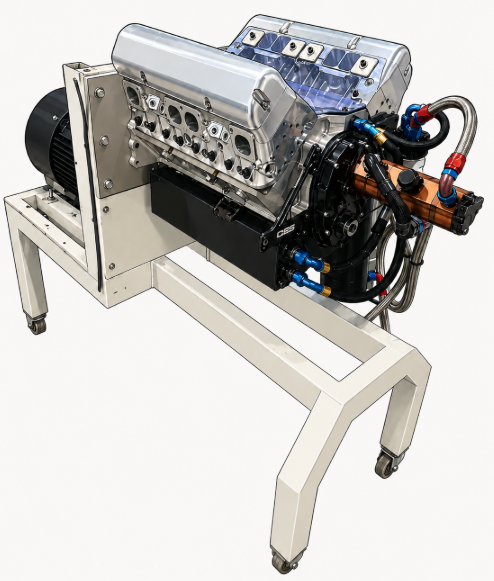
Stylised real-world Spintron camshaft dyno rig with the background removed
Stylised real-rig overview image used as the public-facing Spintron / camshaft dyno visual.

What is being measured?

Camshaft motion becomes valve lift data.

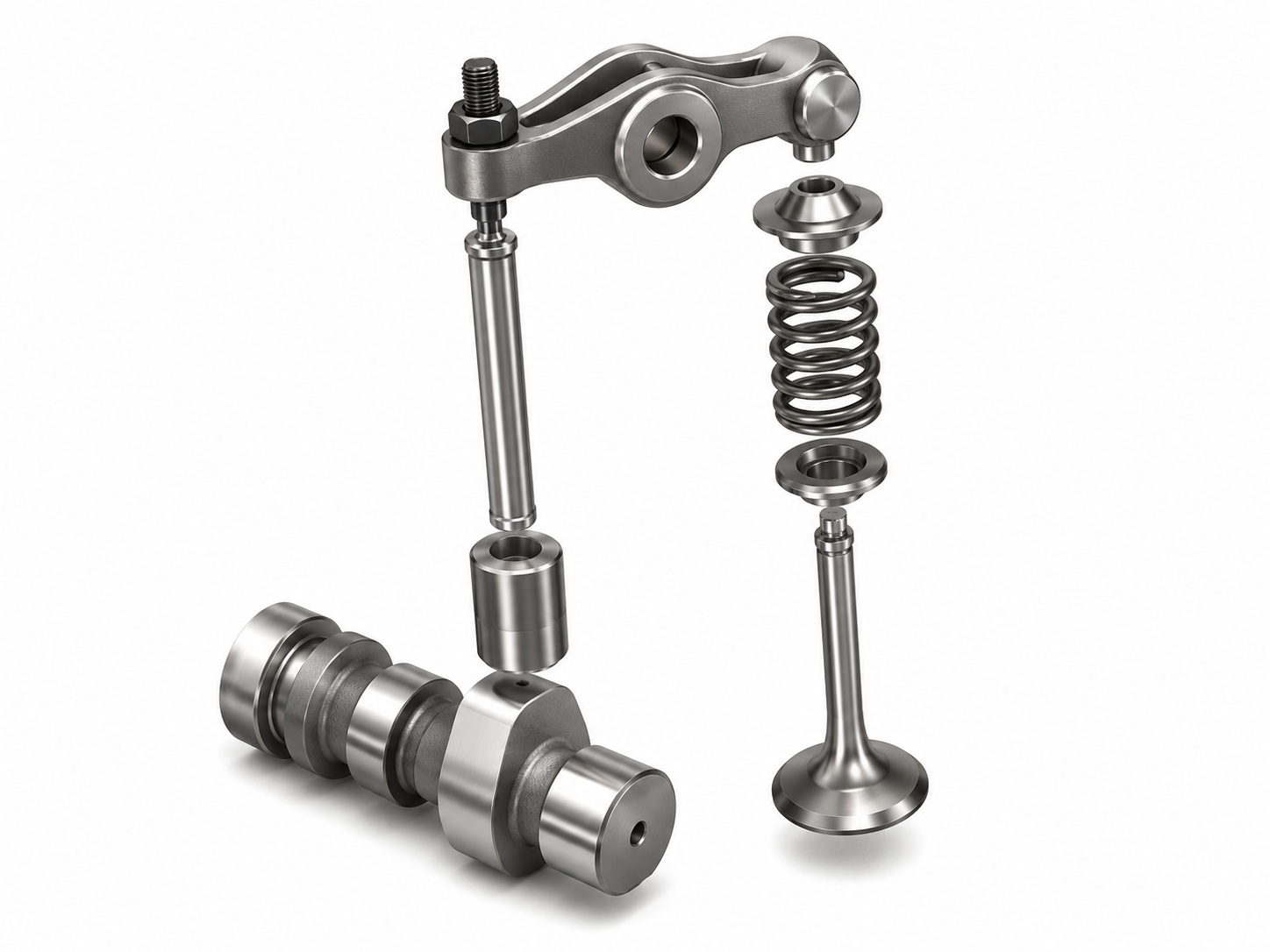
A camshaft is a rotating shaft with shaped lobes that control when engine valves open and close. As each lobe rotates, it pushes through the valvetrain to lift the valve against the spring, then the spring closes the valve as the lobe rotates away.

Camshaft lobe, follower, pushrod, rocker arm, valve spring, and valve showing how rotating cam motion becomes valve lift

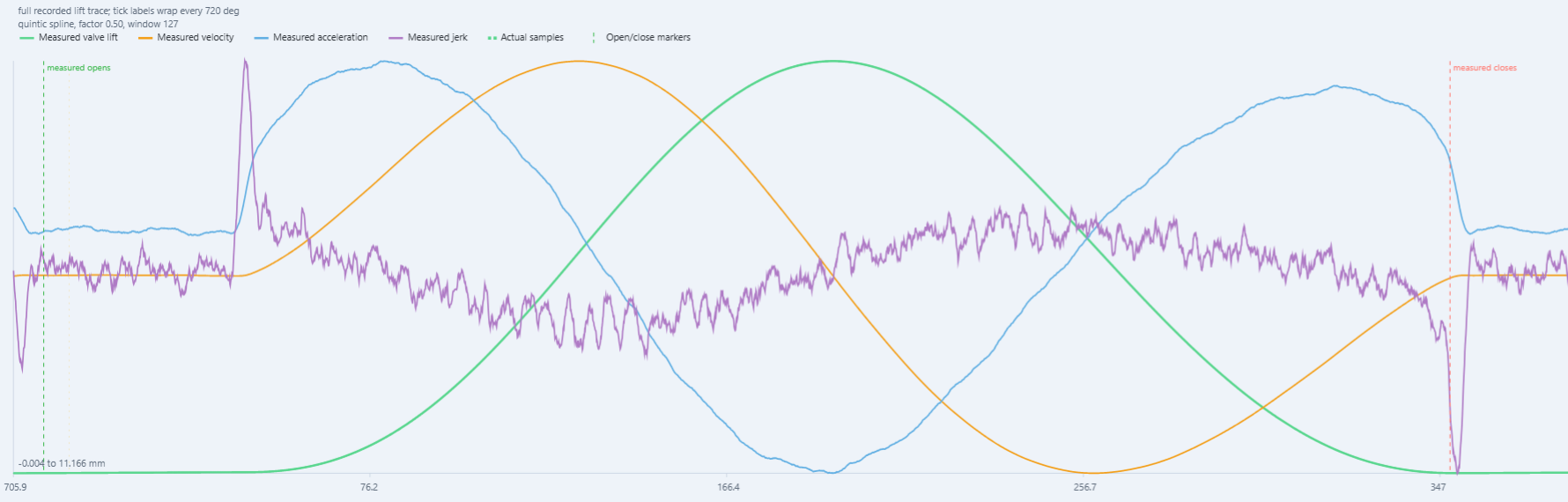
The Spintron project is about measuring that motion accurately. The encoder provides shaft angle and RPM, while the Keyence laser measures lift. The software then aligns those signals so the useful plot becomes lift versus camshaft angle, not just lift versus time or commanded motor speed.

Camshaft lobe
Converts rotation into a timed lift profile.
Laser measurement
Captures valve, follower, or target displacement.
Encoder reference
Turns shaft motion into measured RPM and angle.
Analysis output
Plots lift, velocity, acceleration, and jerk against cam angle.
Spintron analysis plot showing measured valve lift, velocity, acceleration, jerk, sample points, and valve open and close markers against continuous camshaft angle
Example analysis target: lift, velocity, acceleration, and jerk plotted against continuous camshaft angle.
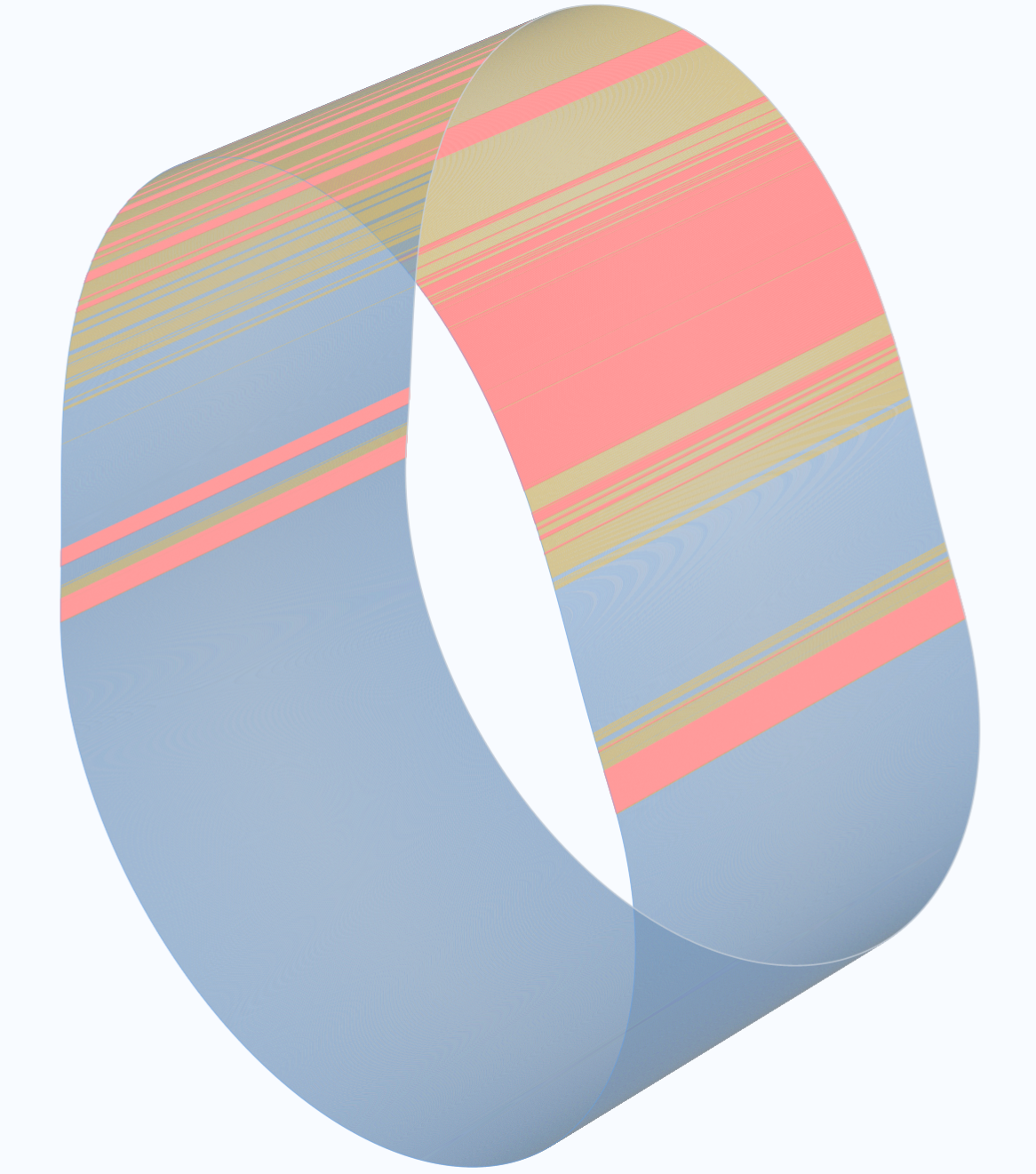
Cam-lobe visualisation with problematic regions highlighted in yellow and red for engineering review
Cam-lobe visualisation showing highlighted regions where the measured or machined profile may need closer inspection.

How to read the motion data

Lift
Measured valve/follower displacement from the laser.
Velocity
How quickly the valve opens or closes.
Acceleration
How quickly valve velocity changes.
Jerk
How quickly acceleration changes. Highly sensitive to noise.

The useful engineering result is not just lift over time. It is lift, velocity, acceleration, and jerk plotted against camshaft angle using encoder feedback as the angular reference.

Interactive system overview

Spintron control and measurement architecture.

Component-level view of the PC dashboard, Nucleo controller, VFD drive path, encoder feedback, Keyence laser chain, analog front-end, and hardwired safety boundary.

System map Operator software, controller I/O, drive control, sensing, and data capture

Component cards show the main hardware and software blocks. Small circles on the connection lines open the wire type, signal carried, and implementation notes.

Project visuals

The main visuals are split between the operator software already working in simulation and the real mechanical context for fitting encoder hardware to the existing shaft area.

PC program visuals

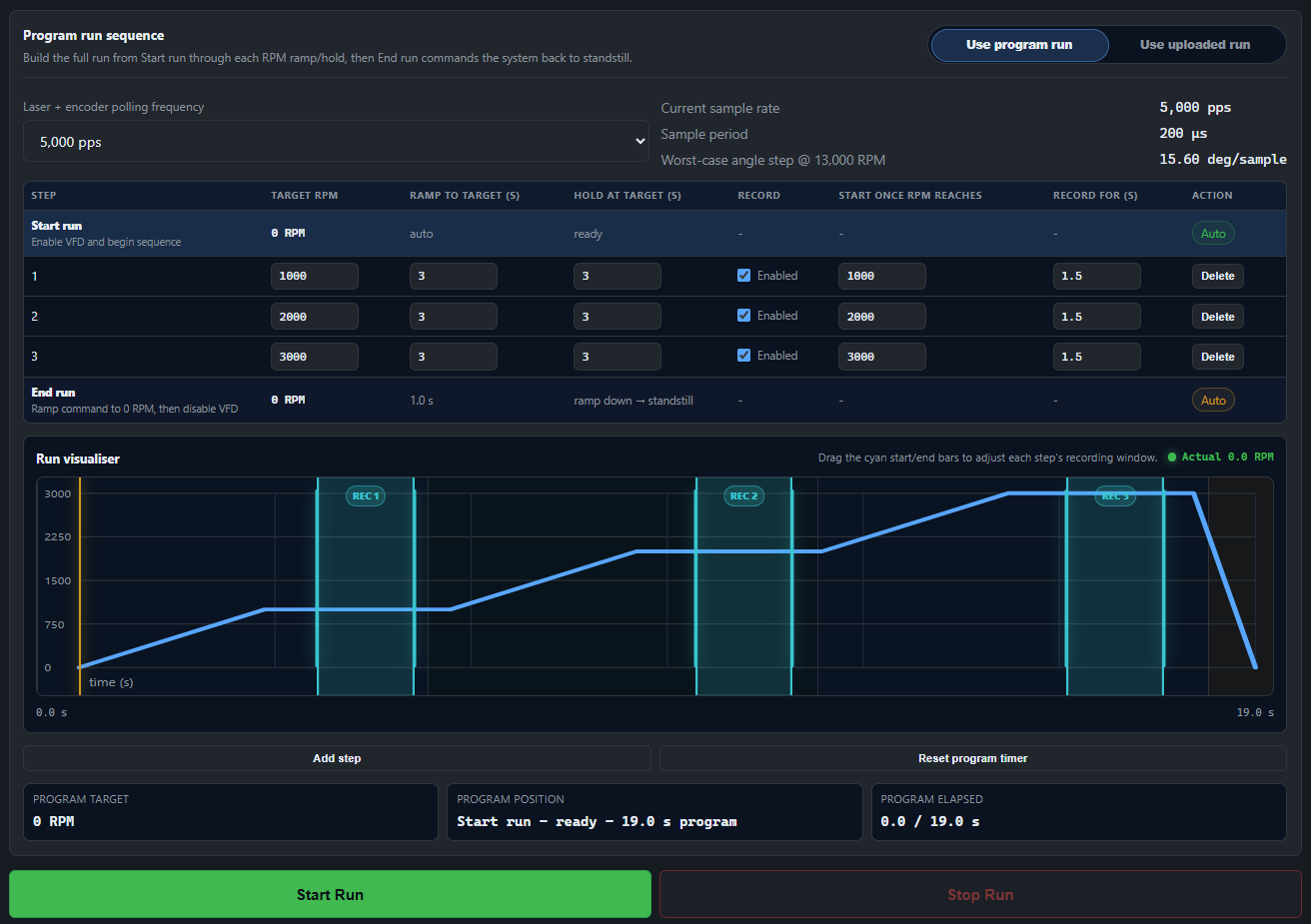
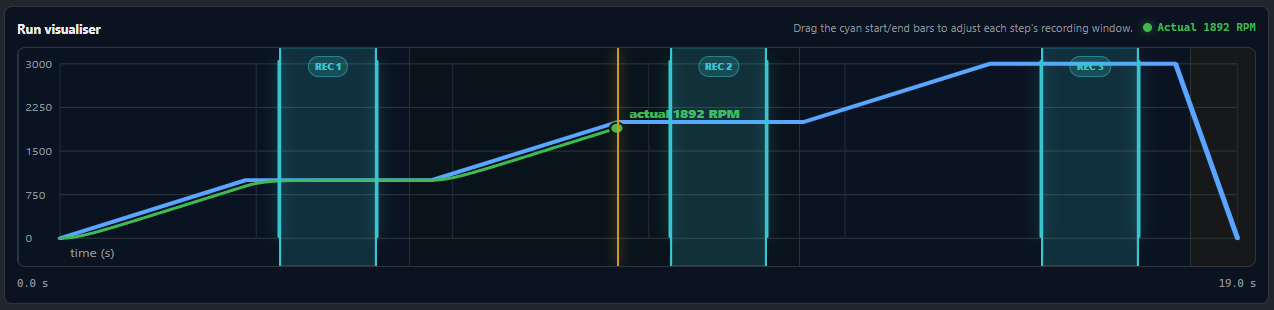
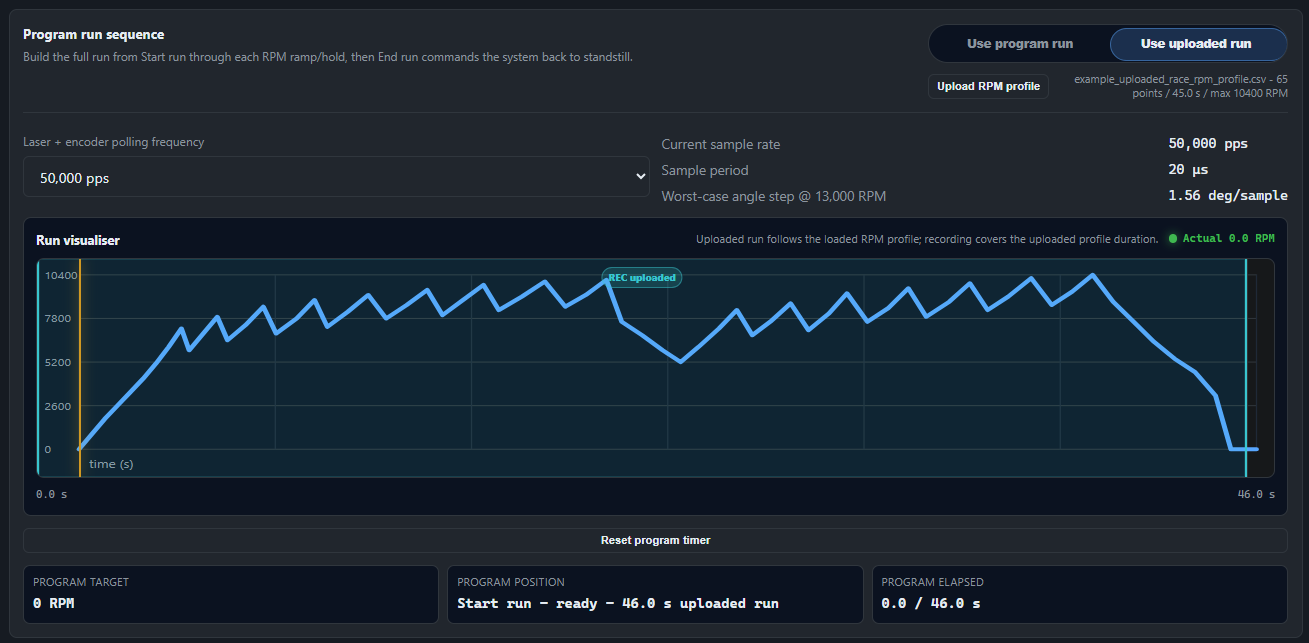
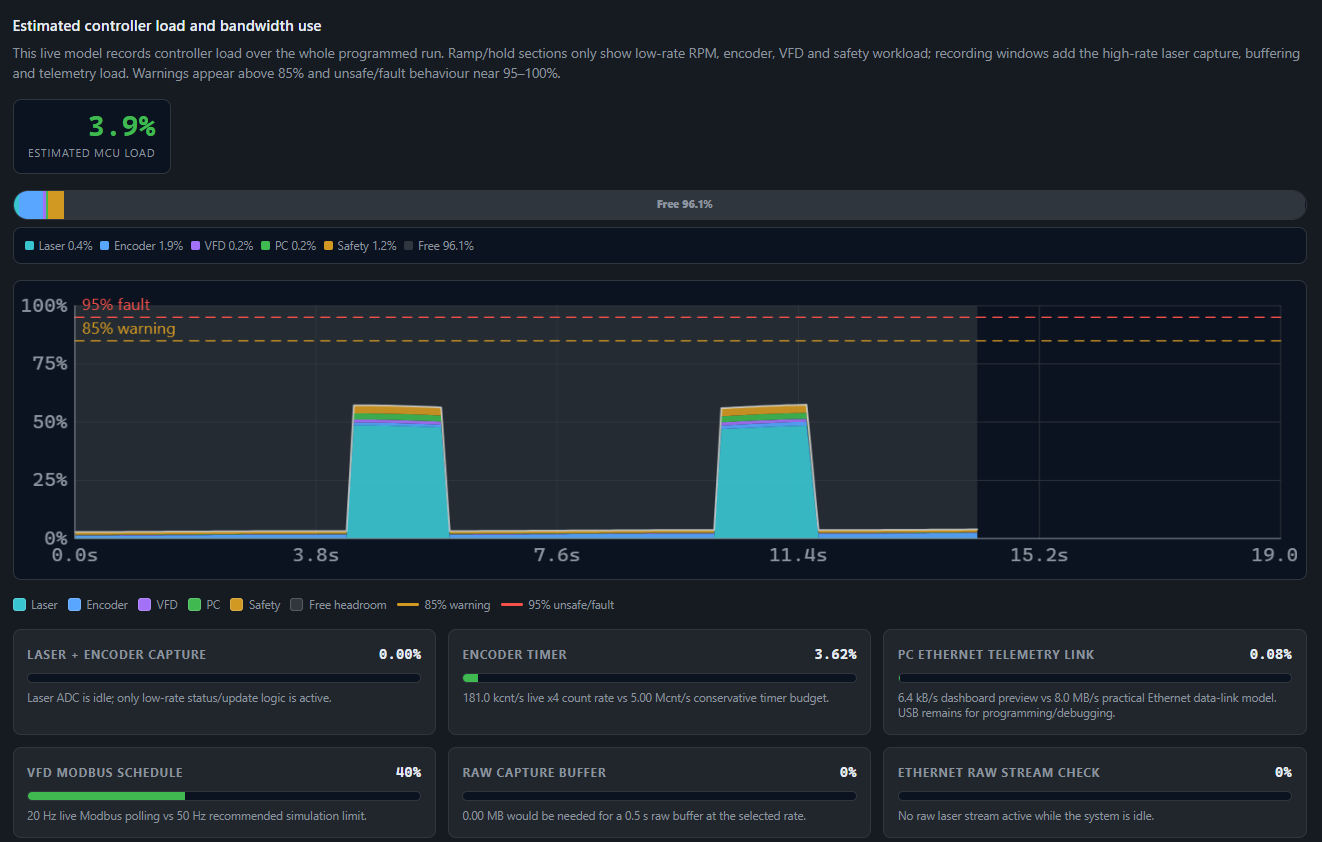
Screenshots from the local browser dashboard showing run programming, live RPM visualisation, uploaded RPM traces, recording windows, and controller capacity modelling.

Mechanical and CAD visuals

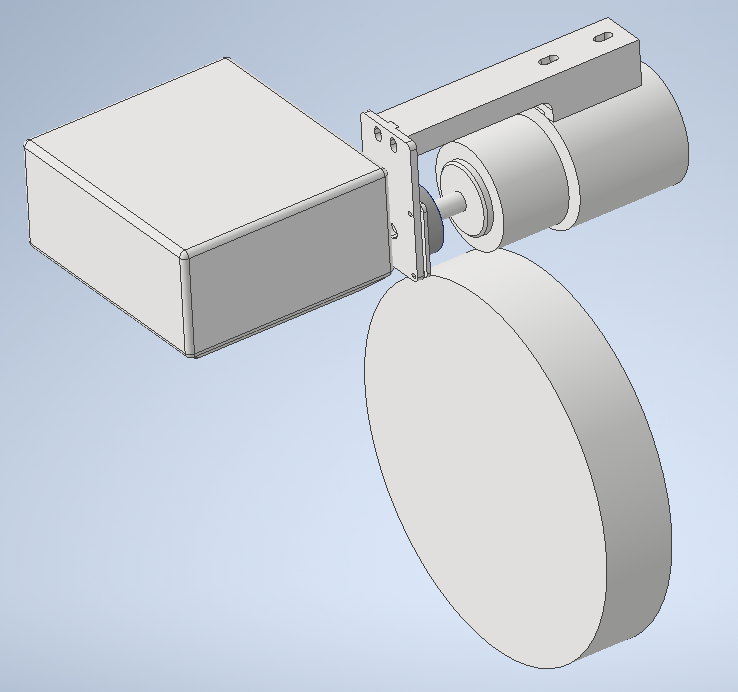
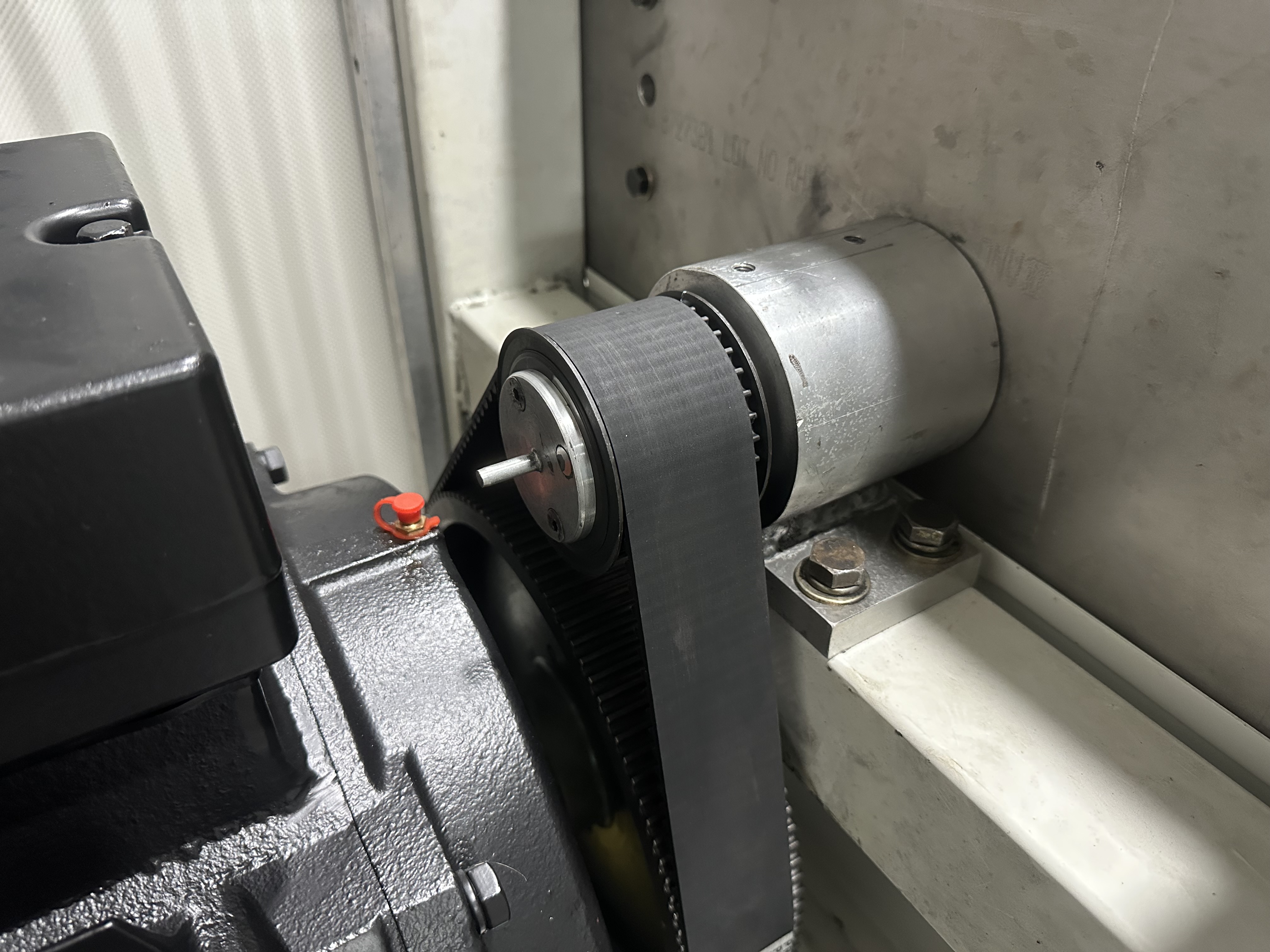
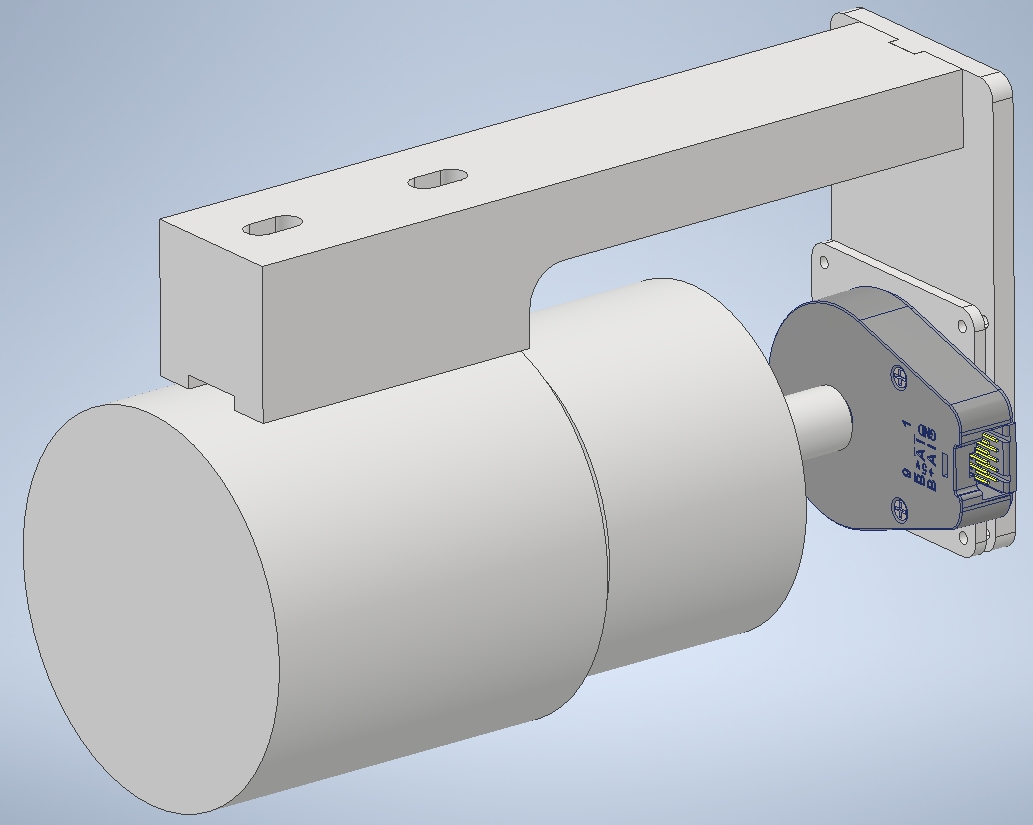
CAD and real-machine visuals showing the shaft area, encoder mounting concept, surrounding geometry, and clearance constraints for the physical sensing hardware.

My contribution

  • Designed the control-system architecture connecting an HMI-style dashboard, microcontroller interface, VFD, encoder, and laser measurement path.
  • Built the operator dashboard prototype for run setup, telemetry, recording windows, uploaded RPM traces, and data review.
  • Planned electrical signal paths and documentation for encoder, laser, VFD, shielding, isolation, and protected inputs.
  • Produced CAD and mounting concepts for fitting sensing hardware to the existing machine geometry.

Results and current status

The project produced a clear three-part system design: a working local browser dashboard in simulation mode, a Nucleo-based electrical / microcontroller architecture for connecting the PC to the VFD, encoder, and Keyence laser, and physical CAD work for fitting sensing hardware to the existing machine. It meets the objective at design and software-prototype level by showing how the machine could be controlled, monitored, logged, and analysed from one integrated program.

The simulation side is already developed enough to test the operator workflow, run planning, uploaded RPM traces, recording windows, high-speed capture model, and post-run analysis approach. The software also separates high-rate saved samples from lower-rate live preview data and includes data-processing tools so lift, velocity, acceleration, and jerk can be reviewed without simply amplifying noise. STM32 firmware, real hardware communication, physical commissioning, calibration, and measured performance validation remain the next major steps.

Technical details

Objective, requirements, and project scope

The objective was to create an all-in-one system that could let an operator control the camshaft test machine from another room, program RPM runs, monitor the machine live, and capture useful valve-lift data. The machine already had the Keyence laser measurement hardware available. The missing piece was an integrated control and data-acquisition approach that could bring the VFD, encoder, laser, microcontroller, and computer program together.

Design requirements

  • Create an all-in-one computer program that could operate the machine remotely from another room.
  • Control motor speed through the VFD while using encoder feedback as the true shaft RPM and angular-position reference.
  • Use the existing Keyence laser measurement system to capture valve or follower lift data.
  • Add a microcontroller layer between the PC and machine hardware so the VFD, encoder, and laser could be coordinated from one interface.
  • Synchronise laser displacement and encoder angle so valve lift can be analysed against camshaft position.
  • Measure the existing physical setup and design mounts that fit the current machine rather than assuming a clean-sheet rig.
  • Provide run programming, live visualisation, logging, and post-run analysis tools for angle, velocity, acceleration, and jerk.
  • Process measured data carefully so smoothing reduces noise without hiding useful camshaft behaviour.

Three-part scope

Computer program
All-in-one operator software for remote machine control, program runs, live visualisation, recording windows, data logging, and post-run camshaft analysis.
Electrical / microcontroller
Nucleo-based interface between the PC and machine hardware, coordinating VFD control, encoder angle/RPM feedback, and the existing Keyence laser measurement system.
Physical CAD / mounts
Measured the current rig, modelled the surrounding setup, and designed encoder mounting hardware that would fit the existing machine and align accurately to the shaft axis.
Dashboard workflow

The dashboard is the operator-facing workflow for setting up runs, monitoring the machine at a low live update rate, and opening saved high-speed data for analysis after the run.

Dashboard features

Run programming
Build a sequence from start run through multiple RPM steps to end run, with target RPM, ramp time, hold time, and recording settings per step.
Recording windows
Enable high-speed capture only where useful, then move the start/end bars or the whole shaded window inside the run visualiser.
RPM source modes
Use programmed ramp/hold steps or upload a CSV/TXT RPM trace so the rig can replay a real-world speed profile.
Live run visualiser
Show desired RPM, simulated encoder feedback, current-time marker, ramp/hold behaviour, and capture windows on one time-based plot.
Analysis viewer
Inspect cam lift versus continuous camshaft angle, plus derived velocity, acceleration, and jerk from the recorded lift trace.
Capacity model
Estimate controller load, Ethernet bandwidth, buffer use, VFD polling, safety/status overhead, and remaining capacity during a run.

Dashboard workflow

  1. Connect to the machine from the computer interface, with the Nucleo acting as the hardware layer between the PC and VFD, encoder, and laser.
  2. Create a programmed RPM sequence or upload a time-versus-RPM trace, such as a logged race profile.
  3. Set target RPM, ramp time, hold time, sample rate, trigger RPM, recording duration, and which steps should capture high-speed data.
  4. Preview the full run as a time-based RPM curve, including desired RPM, actual feedback, current run position, and recording windows.
  5. Run the sequence, monitor live values, and keep the browser responsive through decimated dashboard updates.
  6. Open the full-page analysis viewer after the run to inspect lift, velocity, acceleration, and jerk against camshaft angle.
Software implementation and simulation status

The current program is a local browser dashboard built primarily as a single-file HTML/CSS/JavaScript application. In simulation mode it can run by itself in the browser on the Lenovo PC. Real-hardware mode has been started through a Python WebSocket bridge scaffold, but the STM32 firmware and end-to-end hardware communication still need to be implemented and validated.

App type
Local browser dashboard / browser UI running on the machine PC, not a packaged desktop application.
Frontend
Single-file HTML/CSS/JavaScript dashboard built with vanilla JavaScript rather than a large frontend framework.
Visualisation
Browser-based canvas / SVG / DOM-style plotting for the run visualiser, live feedback, capacity model, and full-page analysis viewer.
Bridge scaffold
Python WebSocket bridge started for future real-hardware mode, with the dashboard designed to connect locally at ws://127.0.0.1:8765.
Firmware state
STM32 / NUCLEO firmware is not built yet. The dashboard currently models the controller behaviour and expected hardware messages.
Hardware references
Dashboard updated around NUCLEO-H753ZI, RS422 encoder receiver board, protected 0-10 V to 0-3.3 V laser front-end, LK-GD500 0-10 V output, and VFD calibration data.

Working in simulation

  • Program run planner with start/end run states, RPM steps, ramp times, hold times, per-step recording enable, trigger RPM, and recording duration.
  • Run visualiser showing desired RPM, simulated actual RPM from encoder-style feedback, a live time marker, ramp/hold sections, and final ramp-down behaviour.
  • Draggable recording windows where the left/right bars can be adjusted independently or moved together by dragging the middle of the window.
  • Uploaded RPM trace mode for loading CSV/TXT RPM-over-time files and replaying race-style speed profiles in the dashboard.
  • Full-page data viewer for cam lift versus continuous multi-revolution camshaft angle, with derived velocity, acceleration, and jerk.
  • Smoothing, windowing, zoom/pan-style analysis tools, separate recording selection, and high-speed saved capture modelling up to 50,000 points per second.
  • Capacity and bandwidth visualiser for Ethernet throughput, decimated 50-100 pps live display, controller load, capture buffering, and VFD communication overhead.
  • VFD frequency calibration table based on measured Hz/RPM points.

Implementation status

Working in simulation
Run planning, live visualisation, uploaded RPM traces, recording windows, logged-data model, full-page analysis, smoothing controls, capacity model, and VFD calibration table.
Partly started
Real-hardware toggle, Python WebSocket bridge structure, telemetry message handling, and command payload format for programmed or uploaded runs.
Still to build
STM32 firmware, real Ethernet streaming, encoder timer capture, ADC/DMA laser sampling, VFD Modbus register handling, safety/interlock I/O mapping, CubeMX pin map, and end-to-end hardware capture.
Electrical and microcontroller integration

The electrical / microcontroller section was developed because the test rig needed one control pathway rather than separate disconnected systems. The Nucleo sits between the computer and the machine hardware: the PC provides the operator interface, while the Nucleo handles the machine-facing signals for the VFD, encoder, and Keyence laser measurement path.

The core technical challenge is synchronisation. RPM and cam angle need to come from the encoder, valve lift comes from the Keyence laser, and the run state comes from the programmed VFD/RPM sequence. Those streams have to line up so the saved data can be analysed as cam lift versus camshaft angle rather than as unrelated live readings.

Hardware integration plan

Already available
PC, Keyence LK-G82 laser head, LK-GD500 controller, Keyence laser cable, and VFD.
Controller to add
NUCLEO-H753ZI board used as the machine-interface controller between the PC, VFD, encoder, and laser measurement path.
Encoder chain
US Digital H6-1024-IE-D encoder into a 26C32 / RS422-style incremental encoder receiver board, then into Nucleo timer / index inputs.
Laser chain
LK-GD500 OUT1(V) and OUT1 0V through shielded analog cable into a high-speed 0-10 V to 0-3.3 V laser ADC front-end, then into the Nucleo ADC.
VFD chain
Nucleo UART/GPIO into a TTL/UART-to-RS485 interface board, then RS485 A/B wiring to the VFD control terminals for Modbus-style control.
Power and wiring
Dedicated 5 V DIN-rail supply for encoder/interface power, shielded analog cabling, short low-voltage wiring, RS485 twisted pair, and termination where required.

Assembly sequence

  1. Connect the PC to the Nucleo over USB for programming/debugging and over Ethernet for programmed runs, telemetry, and recorded data transfer.
  2. Wire the encoder through the shielded encoder cable and RS422 receiver board so the Nucleo reads true shaft RPM, angle, and index reference.
  3. Route the Keyence LK-GD500 analog output through a fast protected ADC front-end instead of wiring the 0-10 V output directly to the microcontroller.
  4. Wire the RS485 interface board between the Nucleo and VFD so the computer program can command speed through the microcontroller path.
  5. Keep emergency stop, guarding, VFD enable/safety, and motor isolation as hardwired safety functions rather than relying on software control.

I/O and signal summary

VFD command
RS485 / Modbus-style command path planned from the Nucleo through an interface board to the VFD control terminals.
Control output
Encoder A/B/Z
Differential encoder signal through an RS422 receiver board into timer and index inputs for RPM and cam angle.
High-speed digital feedback
Keyence laser
LK-GD500 0-10 V analog output scaled and protected before entering a Nucleo ADC channel.
Analog measurement
Dashboard telemetry
Controller status, measured RPM, run state, sample rate, capture state, and capacity estimates returned to the local HMI.
Status and data
High-speed samples
Time, target RPM, measured RPM, cam angle, lift, and derived values saved separately from the low-rate live display.
Logged data
Safety signals
E-stop, guarding, motor isolation, and VFD enable treated as hardwired machine safety functions.
Safety boundary

Run state model

  1. Idle Machine at standstill, dashboard ready, run profile not active.
  2. Armed Run profile loaded, recording windows checked, controller ready for command sequence.
  3. Ramping VFD target changes while measured encoder RPM is monitored against the desired profile.
  4. Hold Target speed held long enough for stable measurement or recording trigger conditions.
  5. Record High-speed encoder and laser capture active inside the selected recording window.
  6. Ramp down Commanded speed returns to zero and the VFD is brought back to standstill.
  7. Review Saved data is opened for lift, velocity, acceleration, jerk, and cam-angle analysis.
  8. Fault Abnormal state intended to stop the run and require operator review before continuing.

Measurement and sampling model

Encoder resolution
US Digital H6-1024-IE-D incremental encoder, 1024 CPR, 4096 counts per revolution in x4 decoding, about 0.088 degrees per count.
Speed-rating check
The H6 encoder is rated to 10,000 rpm mechanically, so the final mounting shaft speed must be checked before commissioning.
Laser path
Keyence LK-GD500 OUT1(V) configured as 0-10 V, scaled through a fast protected front-end for the Nucleo ADC rather than a slow PLC-style converter.
Saved sample rows
Each saved row is intended to contain time, target RPM, measured RPM, cam angle, laser lift, derived values, VFD telemetry, sample rate, and encoder count.
Capture rates
Dashboard model supports saved capture rates from 1,000 pps through 50,000 pps for maximum-detail laser and encoder captures.
Live preview
The browser display is decimated to roughly 50-100 points per second, while saved run data remains separate from the live preview.
Physical CAD, data processing, and additional visuals

The physical work started with measuring the current machine setup and producing CAD drawings of the surrounding hardware. The encoder mount was then designed around the real motor and shaft area, rather than as a generic bracket. The mount needed to align with the shaft rotational axis and allow the encoder position to be adjusted so it could be centred accurately.

That mechanical alignment matters because the shaft can rotate at very high speed, with target operation up to 13,000 RPM. Eccentricity, misalignment, connector access, cable routing, clearance to existing parts, mounting stiffness, and installation practicality all had to be considered before the sensing hardware could be trusted.

The analysis target is cam lift versus camshaft angle, not just live RPM. Each high-speed capture needs laser displacement and encoder angle in the same timestamped sample row so the recorded data can be plotted and differentiated into velocity, acceleration, and jerk.

Lift trace
Use synchronised laser displacement and encoder angle to visualise valve lift against continuous camshaft angle.
Derived motion
Calculate velocity, acceleration, and jerk so the cam profile can be assessed beyond a simple lift curve.
Smoothing validation
Test smoothing settings to reduce measurement noise without over-smoothing, adding false behaviour, or hiding useful camshaft characteristics.
Analysis purpose
Make the recorded data useful for understanding camshaft behaviour, not just for proving that the rig collected numbers.
Future improvements
  • Write the STM32 / NUCLEO firmware for encoder timer capture, ADC/DMA laser sampling, real-time buffering, command handling, and telemetry streaming.
  • Complete the real Ethernet / serial communication path between the local browser dashboard, Python WebSocket bridge, and microcontroller.
  • Implement and validate VFD Modbus command/register handling, real safety/interlock I/O mapping, and the confirmed STM32CubeMX pin map.
  • Build and document the physical rig wiring, protection, shielding, and isolation layout.
  • Refine the encoder mounting CAD, then validate alignment, stiffness, clearance, and adjustability before high-speed testing.
  • Validate encoder capture, RPM calculation, Keyence laser displacement capture, and sample synchronisation accuracy.
  • Bench-test the 0-10 V to 0-3.3 V laser ADC front-end with a multimeter/oscilloscope before connecting it to the Nucleo ADC.
  • Validate smoothing and derivative calculations against known or trusted camshaft data so analysis does not over-smooth or distort important behaviour.
  • Run controlled tests to evaluate repeatability, noise, speed stability, and measurement uncertainty.
  • Add real test photos, calibration plots, dashboard screenshots, measured run data, and safety/test procedure documentation when publicly shareable.